

Catalog Entries

Managing catalog entries in Ottimate

A catalog entry represents an item from your inventory management system stored in Ottimate. Each catalog entry is associated with a specific vendor and company, enabling accurate invoice matching and price variance detection.

When catalog entries are successfully synchronized, Ottimate automatically matches invoice line items to catalog items and displays match suggestions, including pricing variances, in the item validation interface.
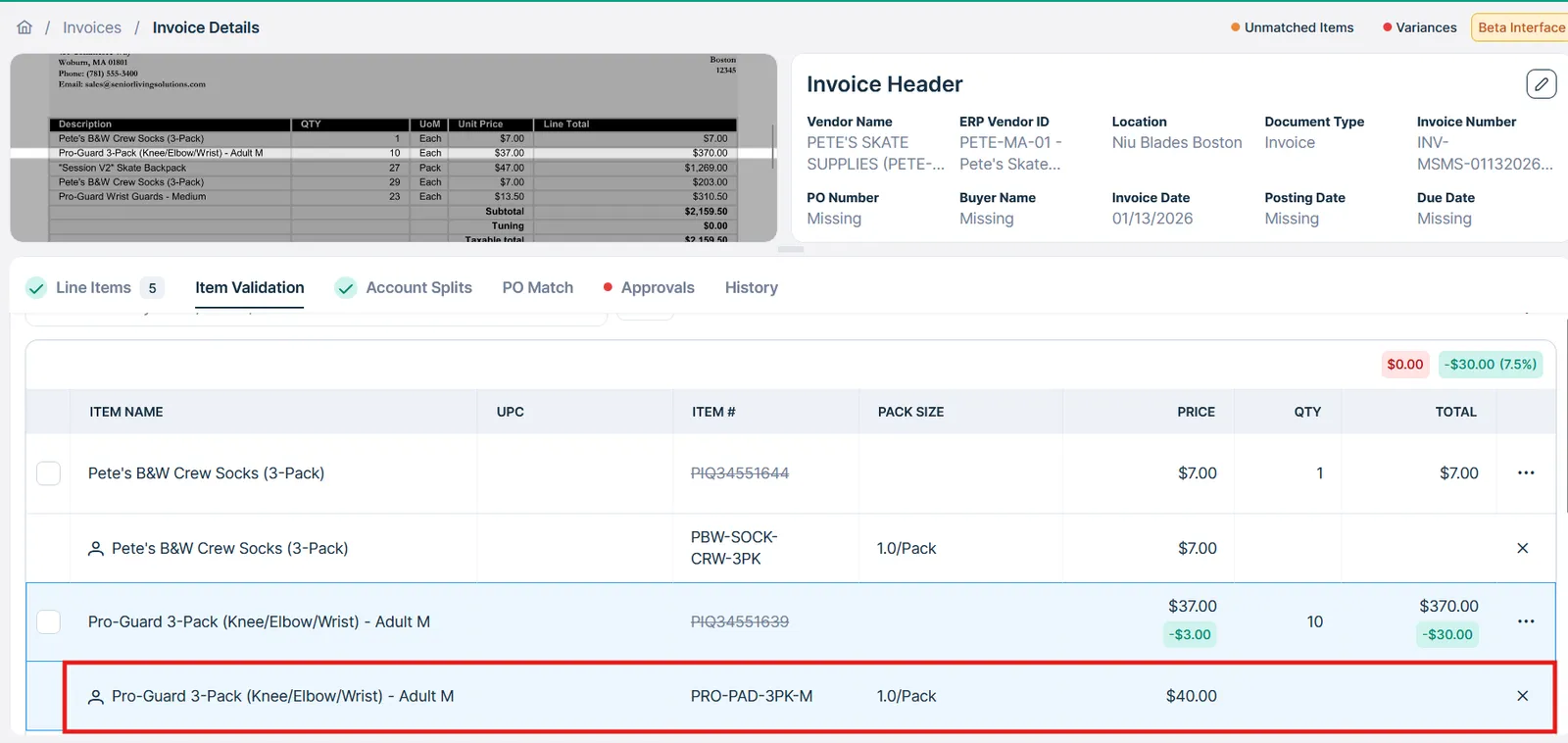
Item-Validation UI on the Ottimate Dashboard

Common Workflows

This guide covers four primary catalog management workflows that can be enabled via API.

  1. Syncing Catalog Data - Push inventory items from your system to Ottimate
  2. Fetching Purchased Items - Retrieve all invoice items matched to a catalog entry
  3. Fetching Matched Catalog Entries - Find which catalog entry an invoice item is matched to
  4. Location-based pricing - Sync location-specific prices (requires Ottimate setup)

Syncing Catalog Data

Syncing your inventory catalog to Ottimate enables automatic invoice matching and price variance detection. This workflow is designed for inventory management systems to maintain an up-to-date catalog in Ottimate.

Single Item Sync

Create a single catalog entry using POST /v1/catalog/entries:

1POST /v1/catalog/entries
2Content-Type: application/json
3
4{
5 "ottimate_company_id": 15196,
6 "erp_vendor_id": "9999",
7 "item_name": "HEINZ KC BBQ BAKED BEANS",
8 "sku": "SKU-BBB-001",
9 "upc": "1300001102",
10 "size": "12.0/16 OZ",
11 "uom": "Case (C)",
12 "price": 19.500000,
13 "unit_price": 1.620000,
14 "reference_id": "1300001102"
15}

Response (201 Created):

1{
2 "id": "cte_12345",
3 "ottimate_company_id": 15196,
4 "reference_id": "1300001102",
5 "item_name": "HEINZ KC BBQ BAKED BEANS",
6 "description": "HEINZ KC BBQ BAKED BEANS",
7 "sku": "SKU-BBB-001",
8 "size": "12.0/16 OZ",
9 "uom": "Case (C)",
10 "price": 19.500000,
11 "unit_price": 1.620000,
12 "erp_vendor_id": "9999",
13 "ottimate_vendor_name": "Sysco Foods",
14 "display_name": "HEINZ KC BBQ BAKED BEANS - Sysco",
15 "created_date": "2024-12-05T10:30:00Z",
16 "last_modified_date": "2024-12-05T10:30:00Z"
17}

Required Fields

FieldTypeDescription
ottimate_company_idIntegerThe Ottimate-assigned company ID. Retrieve via GET /v1/accounts/{id}/companies
erp_vendor_idStringERP-assigned vendor identifier. Must be consistent with the erp_vendor_id used to create an accounting vendor in Ottimate. Verify via GET /v1/vendors
item_nameStringItem name. Populates “Item Name” in the UI and powers AI-based matching. Technically one of item_name or description must be present — the request is only rejected if both are missing — but description is deprecated, so always send item_name.

Including these fields significantly improves matching accuracy:

FieldTypeDescription
reference_idStringYour system’s unique identifier for this item.
skuStringStock-Keeping Unit from your inventory system
upcString12-digit Universal Product Code. If Should always be provided if available to improve matching accuracy
sizeStringPack size using format: {case size}/{unit size} (e.g., “12.0/16 OZ” indicates 12 units in the case, and each unit is 16 fluid ounces)
uomStringUnit of measure (e.g., “CASE”, “EA”, “LB”)
priceDecimalPack price in USD. Accepts decimals up to 5 digits. (e.g. 10.00000)
unit_priceDecimalPrice per individual unit within the pack.
pricesArrayPrices for this entry (see Location-based pricing). Optional, but omitting is deprecated — the entry is still created, and the response includes a warnings field flagging the omission.
allowancesArrayAllowances for this entry. Optional, with the same omission-warning behavior as prices.

For the full list of fields, see POST /v1/catalog/entries.

Bulk Sync

For syncing large catalogs (1,000+ items), use the bulk endpoint POST /v1/catalog/entries/bulk:

1POST /v1/catalog/entries/bulk
2Content-Type: application/json
3
4{
5 "ottimate_company_id": 15196,
6 "entries": [
7 {
8 "erp_vendor_id": "9999",
9 "item_name": "HEINZ KC BBQ BAKED BEANS",
10 "sku": null,
11 "upc": "1300001102",
12 "size": "12.0/16 OZ",
13 "uom": "Case (C)",
14 "price": 12.99,
15 "reference_id": "1300001102"
16 },
17 {
18 "erp_vendor_id": "9999",
19 "item_name": "BACON BITS PER LB",
20 "sku": null,
21 "upc": "23585000000",
22 "size": "1.0/LB",
23 "uom": "Weight (W)",
24 "price": 3.99,
25 "catalog_unique_key": "1300001102"
26 }
27 // ... up to 1000 entries per request
28 ]
29}

Response (202 Accepted):

This endpoint is always asynchronous. It validates your request, queues the work, and immediately returns a batch handle — it never returns per-item results directly.

1{
2 "version": "1.0.0",
3 "status": "processing",
4 "batch_id": "bch_abc123",
5 "batch_url": "/v1/batch/bch_abc123/progress",
6 "results_url": "/v1/batch/bch_abc123/results",
7 "summary": {
8 "count": 2
9 }
10}

Poll batch_url (GET /v1/batch/{id}/progress) until status is completed, then call results_url (GET /v1/batch/{id}/results) to get the per-entry outcomes (created/updated/error) for the batch. See the Batch API reference for the full polling contract.

Understanding the upsert pattern for bulk operations

Bulk catalog synchronization uses an upsert (update or insert) pattern to prevent duplicates. Ottimate automatically derives a catalog_unique_key for every entry — exactly which fields it’s built from depends on your company’s catalog matching tier and ERP integration:

Starter/default tier always uses:

catalog_unique_key = erp_vendor_id + item_name + sku + pack_size

UPC has no effect on this formula for the Starter tier.

Growth/Premium tier (and some ERP integrations, e.g. Acumatica/Pyxis, regardless of tier) use UPC-based formulas instead:

catalog_unique_key = erp_vendor_id + upc + buying_format # Growth/Premium
catalog_unique_key = erp_vendor_id + upc # Acumatica/Pyxis

For these UPC-based formulas specifically: if the entry being submitted has no upc value, the key falls back to the Starter-tier formula above (erp_vendor_id + item_name + sku + pack_size) for that entry.

In all cases, the key that’s actually stored is always this auto-derived value — if you pass your own catalog_unique_key in the request (as shown below), it’s used only to look up a matching row for the upsert; it does not become the entry’s stored key.

When you POST to /catalog/entries/bulk:

  • If the catalog_unique_key doesn’t exist → Creates a new catalog entry
  • If the catalog_unique_key exists → Updates the existing catalog entry

This lets you safely sync your entire catalog repeatedly without creating duplicates.

To avoid duplicating items through an upsert operation, keep erp_vendor_id, item_name, size, uom, upc consistent, or use PATCH catalog/entries/{entry_id} to update entries individually.

Updating a Catalog Entry

Update an existing entry with PATCH /v1/catalog/entries/{id}. Only the fields you include are changed — omitted fields keep their current value:

1PATCH /v1/catalog/entries/cte_12345
2Content-Type: application/json
3
4{
5 "price": 26.99,
6 "size": "6 CT"
7}

catalog_unique_key is accepted on this request but has no effect — the entry’s key is always regenerated from your company’s key format on save (see Understanding the upsert pattern above). A value you submit here does not rename or override the stored key.

prices and allowances cannot be changed through this endpoint. They can only be set when the entry is created — sending either field to PATCH /v1/catalog/entries/{id} returns a 400. To add prices or allowances after creation, use the standalone endpoints (POST /v1/catalog/prices, POST /v1/catalog/allowances); existing allowances can be updated with PATCH /v1/catalog/allowances/{id}.

Retrieving Catalog Entries

Before syncing, you may want to check what’s already in Ottimate:

List all entries for a company:

1GET /v1/catalog/entries?ottimate_company_id=15196&limit=100

ottimate_company_id is optional — if omitted, results are scoped to all companies the caller has access to.

Search for specific items:

1GET /v1/catalog/entries?ottimate_company_id=15196&search=tomato&erp_vendor_id=Sysco

search matches against item name, description, sku, and upc.

Get full details for a specific entry:

1GET /v1/catalog/entries/{id}

Prices and allowances are included whenever the entry has any — there is no expand parameter on this endpoint. If the entry has no prices or no allowances, the corresponding field is omitted from the response entirely rather than returned as an empty array.

On the list endpoint (above), expand=prices or expand=allowances returns full entry objects with both prices and allowances included; the two values can’t be selected independently.


Fetching Purchased Items for a Catalog Entry

Once catalog entries are matched to invoice items, you can retrieve all purchased items associated with a specific catalog entry. This is useful for:

  • Analyzing purchase history for a specific catalog item
  • Identifying price variances over time

Endpoint

1GET /v1/catalog/variances/{catalog_entry_id}/invoice-items

Example Request

1GET /v1/catalog/variances/cte_12345/invoice-items?ottimate_company_id=15196

Response

1{
2 "count": 150,
3 "next": "https://api.ottimate.com/v1/catalog/variances/cte_12345/invoice-items?page=2",
4 "previous": null,
5 "results": [
6 {
7 "id": 821125897,
8 "invoice_id": 139851296,
9 "invoice_number": "I-1767901026-2",
10 "ottimate_location_id": 51582,
11 "item_name": "Sample Item 821125897",
12 "price": 1.200000,
13 "quantity": 28.000000,
14 "invoice_date": "2026-01-11",
15 "price_variance": 0.19999999999999996,
16 "effective_price": 1.1928571428571428
17 },
18 {
19 "id": 821125898,
20 "invoice_id": 139851297,
21 "invoice_number": "I-1767901026-2",
22 "ottimate_location_id": 51582,
23 "item_name": "Sample Item 821125897",
24 "price": 1.000000,
25 "quantity": 12.000000,
26 "invoice_date": "2026-01-04",
27 "price_variance": null,
28 "effective_price": 1.0
29 }
30 // ... more purchased items
31 ]
32}

Purchased Items

The result object includes purchased item objects with the following fields:

FieldDescription
idOttimate-generated ID for the invoice line item.
invoice_idOttimate-generated identifier for the invoice. Can be used to fetch invoice details through GET /v1/invoices/{invoice_id}
invoice_numberVendor-issued Invoice Number extracted from the original invoice document
item_nameItem name extracted from the invoice
priceActual item price on the invoice
effective_priceActual item price - any applicable allowances and discounts
price_varianceOverbilling/underbilling depending on the difference between item price on the invoice, catalog price, adjusting for allowances.

Fetching Matched Catalog Entries for Purchased Items

When reviewing invoices, you may need to see which catalog entries are matched to invoice line items.

Invoice List with Expansion

Retrieve invoices with catalog matching information using the expand=items parameter. To set the expand parameter, you must also limit the date range to 30 days.

Note that only invoice items matched to a catalog entry will return a catalog entry object.

1GET /v1/invoices?date_from=2025-12-15&date_to=2026-01-14&expand=items

Example Response

1{
2 "id": "124425480",
3 "invoice_number": "202601050949",
4 "type": "invoice",
5 "ottimate_vendor_name": "PETE-MA-01",
6 "ottimate_vendor_id": "833906",
7 "erp_vendor_id": "PETE-MA-01",
8 "ottimate_location_name": "Sample Location",
9 "ottimate_location_id": "48764",
10 "created_at": "2026-01-05T06:49:24.609646-08:00",
11 "invoice_date": "2026-01-05",
12 "due_date": "2026-01-30",
13 "total_amount": 155.00,
14 "total_tax": 0.00,
15 "status": "ready-for-export",
16 "payment_status": "unpaid",
17 "error": null,
18 "currency": "USD",
19 "outstanding_balance": 155.00,
20 "purchase_order": "",
21 "has_unmatched_items": null,
22 "approved_date": "2026-01-06T11:40:07.536994-08:00",
23 "exported_date": null,
24 "on_hold": {
25 "is_held": true,
26 "reason": ""
27 },
28 "posting_date": null,
29 "items": [
30 {
31 "line": "735920103",
32 "ottimate_item_id": "34551621",
33 "name": "t-shirt xl",
34 "display_name": "t-shirt xl",
35 "sku": "",
36 "type": "item",
37 "quantity": 1.0,
38 "unit": "Each",
39 "unit_price": 155.00,
40 "line_total": 155.00,
41 "charge_type": "",
42 "is_taxed": false,
43 "pack_size": null,
44 "uom": null,
45 "catalog_entry": {
46 "id": "cte_TQoHfgJ9S8mT",
47 "ottimate_company_id": 15365,
48 "reference_id": "pbwteelogoxl",
49 "catalog_unique_key": "petema01-pbwteelogoxl-10each-petesbwshoptshirtxl",
50 "item_name": "Pete's B&W Shop T-Shirt - XL",
51 "description": "Pete's B&W Shop T-Shirt - XL",
52 "original_description": "Pete's B&W Shop T-Shirt - XL",
53 "sku": "PBW-TEE-LOGO-XL",
54 "upc": "",
55 "size": "1.0/Each",
56 "uom": "Each",
57 "price": 11.000000,
58 "unit_price": 11.000000,
59 "last_purchased_price": null,
60 "erp_vendor_id": "PETE-MA-01",
61 "ottimate_vendor_name": "",
62 "is_split_case": false,
63 "authorized_vendor": true,
64 "last_purchased_date": "",
65 "created_date": "2025-12-23T08:11:30.213448-08:00",
66 "last_modified_date": "2025-12-23T08:11:30.213432-08:00",
67 "dimensions": "",
68 "properties": "",
69 "display_name": "pete's b&w shop t-shirt - xl (PBW-TEE-LOGO-XL)",
70 "prices": "",
71 "allowances": ""
72 },
73 "custom_fields": {},
74 "dimensions": {}
75 }
76 ]
77 }
78}

Advanced Pricing Configurations

Setup Required: Location-specific pricing and allowances require additional configuration during client onboarding. Contact your Ottimate implementation team before using these features.

Location-Specific Prices

An Ottimate implementation may include setting up multiple locations. By default, catalog prices apply to all locations within a company. For clients with store-based pricing, you can set different prices for different Ottimate locations or location groups.

Configuration Requirements

Before implementing location-specific prices:

  1. Confirm the client company is configured for location-based catalog pricing
  2. Obtain the ottimate_location_id or ottimate_group_id values via GET /v1/accounts/{account_id}/locations

Creating Location-Specific Prices

Include the prices array when creating catalog entries in place of the price field:

1POST /v1/catalog/entries
2Content-Type: application/json
3
4{
5 "ottimate_company_id": 123456,
6 "erp_vendor_id": "PETE-MA-01",
7 "item_name": "Curry Paste Namya 1 kg",
8 "sku": "6340260",
9 "reference_id": "1341219125",
10 "upc": "1341219125",
11 "unit_price": 1.00,
12 "size":"12.0/1 kg",
13 "uom":"Case (C)",
14 "prices":[
15 {
16 "price":60.00000,
17 "price_type":"location",
18 "ottimate_location_id":123,
19 "start_date":"2025-12-23"
20 },
21 {
22 "price":61.00000,
23 "price_type":"location",
24 "ottimate_location_id":456,
25 "start_date":"2026-01-01"
26 }
27 ]
28}

Price Object Fields

FieldTypeRequiredDescription
priceDecimalYesPack price in USD for this location
unit_priceDecimalNoOptional unit price applicable to this location
ottimate_location_idIntegerNoSpecific location ID (use OR ottimate_group_id)
ottimate_group_idIntegerNoLocation group ID (use OR ottimate_location_id)
start_dateDateTimeNoDate when price becomes effective
end_dateDateTimeNoDate when price expires (null = no expiration)

Location-based prices can be created either directly on POST /v1/catalog/entries (as shown above, via price_type: "location" in the prices array) or through the bulk upsert endpoint POST /v1/catalog/entries/bulk — both accept the same prices shape.

Managing Prices Separately

Prices can also be listed and created independently of their catalog entries.

List prices for a catalog entry:

1GET /v1/catalog/prices?ottimate_company_id=15196&catalog_entry_id=cte_12345

Filter by location, effective date, or price type:

1GET /v1/catalog/prices?ottimate_company_id=15196&ottimate_location_id=456&effective_date=2026-01-01&price_type=location

ottimate_company_id is optional — if omitted, results are scoped to all companies the caller has access to.

Create a price:

1POST /v1/catalog/prices
2Content-Type: application/json
3
4{
5 "catalog_entry_id": "cte_12345",
6 "ottimate_company_id": 15196,
7 "price": 25.99,
8 "price_type": "location",
9 "ottimate_location_id": 456,
10 "start_date": "2024-01-01T12:00:00Z"
11}

ottimate_location_id is required when price_type is location, and ottimate_group_id is required when price_type is location_group — omitting the matching ID returns a 400. Supplying either ID when price_type is company is accepted but silently ignored. Supplying both ottimate_location_id and ottimate_group_id together always returns a 400 (“Cannot specify both…”), regardless of price_type.

If end_date is omitted, it defaults to 36,500 days (~100 years) after start_date rather than staying unset.

start_date/end_date are stored as calendar dates in the account’s local timezone, not UTC — a timestamp near UTC midnight (e.g. 00:00:00Z) can land on the previous calendar day locally. Submit a time comfortably within the day (e.g. midday UTC), as in the example above.

reference_id is currently not persisted on prices — the stored value is always auto-generated from the price’s identifying fields, regardless of what you submit.

This endpoint has no update or delete counterpart — to change a price, create a new one with the desired start_date/end_date.

  • Vendors API - Manage vendor relationships required for catalog entries
  • Dimensions API - Configure accounting dimensions for catalog items
  • Invoices API - Work with invoice data and matched catalog entries