

Catalog Entries
A catalog entry represents an item from your inventory management system stored in Ottimate. Each catalog entry is associated with a specific vendor and company, enabling accurate invoice matching and price variance detection.
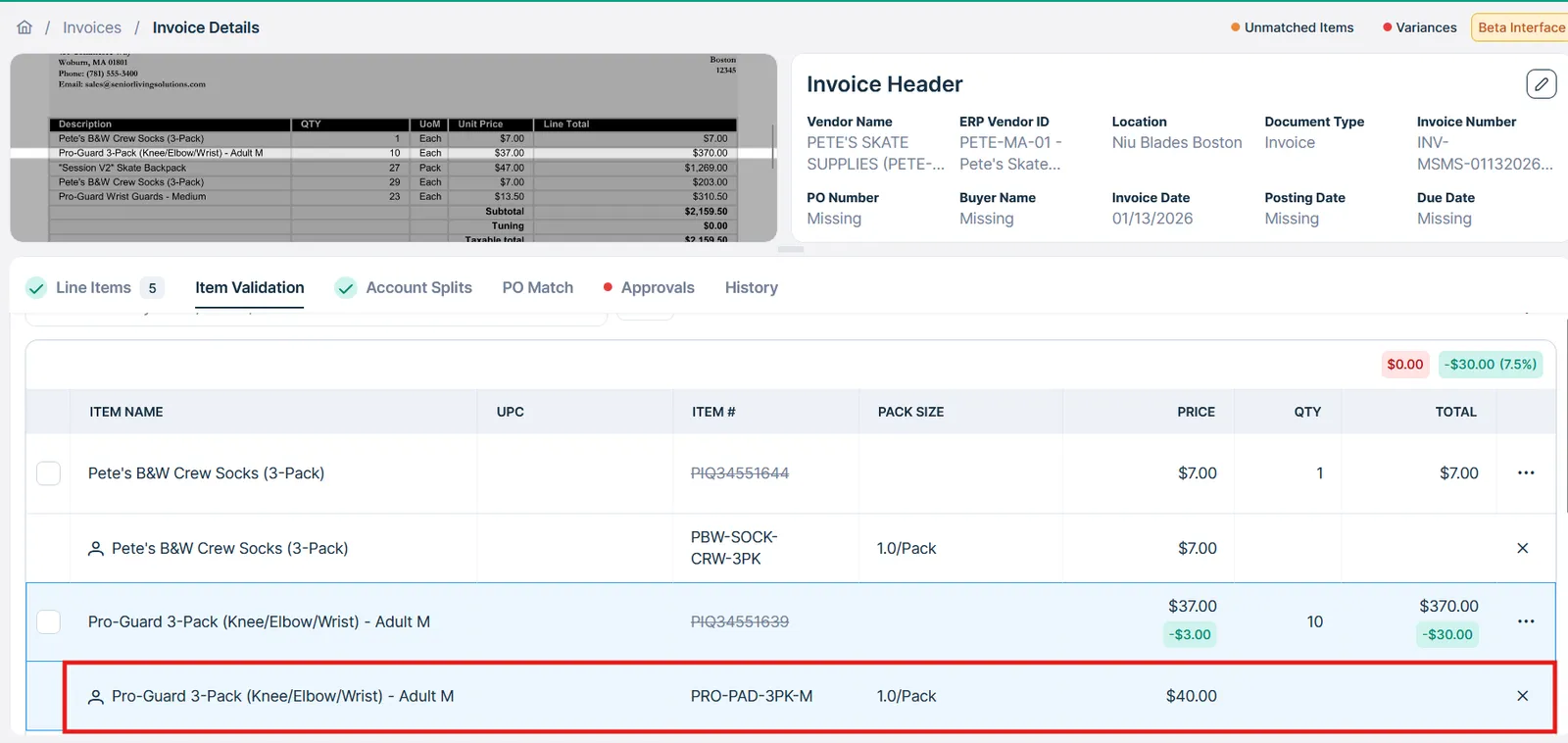
When catalog entries are successfully synchronized, Ottimate automatically matches invoice line items to catalog items and displays match suggestions, including pricing variances, in the item validation interface.
Common Workflows
This guide covers four primary catalog management workflows that can be enabled via API.
- Syncing Catalog Data - Push inventory items from your system to Ottimate
- Fetching Purchased Items - Retrieve all invoice items matched to a catalog entry
- Fetching Matched Catalog Entries - Find which catalog entry an invoice item is matched to
- Location-based pricing - Sync location-specific prices (requires Ottimate setup)
Syncing Catalog Data
Syncing your inventory catalog to Ottimate enables automatic invoice matching and price variance detection. This workflow is designed for inventory management systems to maintain an up-to-date catalog in Ottimate.
Single Item Sync
Create a single catalog entry using POST /v1/catalog/entries:
Response (201 Created):
Required Fields
Recommended Fields
Including these fields significantly improves matching accuracy:
For the full list of fields, see POST /v1/catalog/entries.
Bulk Sync
For syncing large catalogs (1,000+ items), use the bulk endpoint POST /v1/catalog/entries/bulk:
Response (202 Accepted):
This endpoint is always asynchronous. It validates your request, queues the work, and immediately returns a batch handle — it never returns per-item results directly.
Poll batch_url (GET /v1/batch/{id}/progress) until status is completed, then call results_url (GET /v1/batch/{id}/results) to get the per-entry outcomes (created/updated/error) for the batch. See the Batch API reference for the full polling contract.
Understanding the upsert pattern for bulk operations
Bulk catalog synchronization uses an upsert (update or insert) pattern to prevent duplicates. Ottimate automatically derives a catalog_unique_key for every entry — exactly which fields it’s built from depends on your company’s catalog matching tier and ERP integration:
Starter/default tier always uses:
UPC has no effect on this formula for the Starter tier.
Growth/Premium tier (and some ERP integrations, e.g. Acumatica/Pyxis, regardless of tier) use UPC-based formulas instead:
For these UPC-based formulas specifically: if the entry being submitted has no upc value, the key falls back to the Starter-tier formula above (erp_vendor_id + item_name + sku + pack_size) for that entry.
In all cases, the key that’s actually stored is always this auto-derived value — if you pass your own catalog_unique_key in the request (as shown below), it’s used only to look up a matching row for the upsert; it does not become the entry’s stored key.
When you POST to /catalog/entries/bulk:
- If the
catalog_unique_keydoesn’t exist → Creates a new catalog entry - If the
catalog_unique_keyexists → Updates the existing catalog entry
This lets you safely sync your entire catalog repeatedly without creating duplicates.
To avoid duplicating items through an upsert operation, keep erp_vendor_id, item_name, size, uom, upc consistent, or use PATCH catalog/entries/{entry_id} to update entries individually.
Updating a Catalog Entry
Update an existing entry with PATCH /v1/catalog/entries/{id}. Only the fields you include are changed — omitted fields keep their current value:
catalog_unique_key is accepted on this request but has no effect — the entry’s key is always regenerated from your company’s key format on save (see Understanding the upsert pattern above). A value you submit here does not rename or override the stored key.
prices and allowances cannot be changed through this endpoint. They can only be set when the entry is created — sending either field to PATCH /v1/catalog/entries/{id} returns a 400. To add prices or allowances after creation, use the standalone endpoints (POST /v1/catalog/prices, POST /v1/catalog/allowances); existing allowances can be updated with PATCH /v1/catalog/allowances/{id}.
Retrieving Catalog Entries
Before syncing, you may want to check what’s already in Ottimate:
List all entries for a company:
ottimate_company_id is optional — if omitted, results are scoped to all companies the caller has access to.
Search for specific items:
search matches against item name, description, sku, and upc.
Get full details for a specific entry:
Prices and allowances are included whenever the entry has any — there is no expand parameter on this endpoint. If the entry has no prices or no allowances, the corresponding field is omitted from the response entirely rather than returned as an empty array.
On the list endpoint (above), expand=prices or expand=allowances returns full entry objects with both prices and allowances included; the two values can’t be selected independently.
Fetching Purchased Items for a Catalog Entry
Once catalog entries are matched to invoice items, you can retrieve all purchased items associated with a specific catalog entry. This is useful for:
- Analyzing purchase history for a specific catalog item
- Identifying price variances over time
Endpoint
Example Request
Response
Purchased Items
The result object includes purchased item objects with the following fields:
Fetching Matched Catalog Entries for Purchased Items
When reviewing invoices, you may need to see which catalog entries are matched to invoice line items.
Invoice List with Expansion
Retrieve invoices with catalog matching information using the expand=items parameter. To set the expand parameter, you must also limit the date range to 30 days.
Note that only invoice items matched to a catalog entry will return a catalog entry object.
Example Response
Advanced Pricing Configurations
Setup Required: Location-specific pricing and allowances require additional configuration during client onboarding. Contact your Ottimate implementation team before using these features.
Location-Specific Prices
An Ottimate implementation may include setting up multiple locations. By default, catalog prices apply to all locations within a company. For clients with store-based pricing, you can set different prices for different Ottimate locations or location groups.
Configuration Requirements
Before implementing location-specific prices:
- Confirm the client company is configured for location-based catalog pricing
- Obtain the
ottimate_location_idorottimate_group_idvalues viaGET /v1/accounts/{account_id}/locations
Creating Location-Specific Prices
Include the prices array when creating catalog entries in place of the price field:
Price Object Fields
Location-based prices can be created either directly on POST /v1/catalog/entries (as shown above, via price_type: "location" in the prices array) or through the bulk upsert endpoint POST /v1/catalog/entries/bulk — both accept the same prices shape.
Managing Prices Separately
Prices can also be listed and created independently of their catalog entries.
List prices for a catalog entry:
Filter by location, effective date, or price type:
ottimate_company_id is optional — if omitted, results are scoped to all companies the caller has access to.
Create a price:
ottimate_location_id is required when price_type is location, and ottimate_group_id is required when price_type is location_group — omitting the matching ID returns a 400. Supplying either ID when price_type is company is accepted but silently ignored. Supplying both ottimate_location_id and ottimate_group_id together always returns a 400 (“Cannot specify both…”), regardless of price_type.
If end_date is omitted, it defaults to 36,500 days (~100 years) after start_date rather than staying unset.
start_date/end_date are stored as the calendar date of the submitted timestamp (UTC).
A price’s reference_id is always generated by Ottimate from the price’s own identifying fields (catalog entry, effective date, price type, target and amount). It is read-only: reference_id is not accepted on price requests, and a value sent with one is ignored. Read it from the response rather than tracking a value of your own.
This endpoint has no update or delete counterpart — to change a price, create a new one with the desired start_date/end_date.
Related Endpoints
- Vendors API - Manage vendor relationships required for catalog entries
- Dimensions API - Configure accounting dimensions for catalog items
- Invoices API - Work with invoice data and matched catalog entries